Help
What is the MeSH Analyzer?
When conducting a comprehensive search, it is critical to design a strategy that retrieves all potentially relevant articles. Experienced searchers know the power of using controlled vocabularies but also the frustration of not being able to pinpoint articles known to be relevant but missing from the initial retrieval set.
Librarians have long analyzed Medical Subject Headings to design and refine searches. A MeSH analysis grid can help identify the problems in your search strategy by presenting the ways articles are indexed in the MEDLINE database in an easy-to-scan tabular format. Typically, each column in the grid represents an article, with identifying information of the article at the top of the column, such as the PMID, the author, and the year of publication. The MeSH terms are sorted and grouped alphabetically for ease of scanning. Librarians can then easily scan the grid and identify appropriate MeSH terms, term variants, indexing consistency, and the reasons why some articles are retrieved and others are not. This inevitably leads to fresh iterations of the search strategy to include missing important terms.
In addition to MeSH terms, author-assigned keywords, article titles, and abstracts can be included in the analysis grid.
Example MeSH analysis grid:
| PMID | 23508659 | 20213300 | 20135949 | 24931866 |
|---|---|---|---|---|
| Author (Year) | Lippmann J (2013) | Godfrey SJ (2010) | Lentz AK (2010) | Clua E (2014) |
| MeSH Headings | Adult Aged Aged, 80 and over Animals Asphyxia / mo Australia / ep Autopsy |
Alligators and Crocodiles / ah Animals Atlantic Ocean |
Adolescent Adult Animals |
Adolescent Animals |
| Bites and Stings / mo |
Bacteria Bites and Stings / pa Bites and Stings / ve |
Bites and Stings / di Bites and Stings / mo Bites and Stings / th |
Bites and Stings / co |
|
| Cause of Death Craniocerebral Trauma / mo |
Coprophagia / hi |
Child |
||
| Diving / sn Drowning / mo |
||||
| Emergencies |
||||
| Female |
Feces Fossils |
Female |
Fatal Outcome |
|
| Heart Diseases / mo Humans |
History, Ancient |
Humans |
Humans |
|
| Intracranial Embolism / mo |
||||
| Male Middle Aged |
Maryland |
Male Middle Aged |
Male |
|
| New Caledonia |
||||
| Oceans and Seas |
||||
| Retrospective Studies |
||||
| Sharks |
Sharks / ah Sharks / ph Snake Bites / pa Spores |
Sharks |
Sharks Shock / et Sports |
|
| Trauma Severity Indices |
||||
| United States / ep |
||||
| Vertebrates / ah |
||||
| Young Adult |
||||
| Author Keywords | Diving deaths breathhold diving case reports diving accidents scuba surfacesupply breathing apparatus (SSBA) |
Inter-dental distance Kitesurfing Top predator Unprovoked |
Generating a MeSH analysis grid
Creating a MeSH analysis grid manually is a tedious, time-consuming task. Metadata for each article must be manually retrieved, extracted, and pasted into a grid, and then the MeSH terms must be manually sorted and grouped alphabetically. The Yale MeSH Analyzer removes the tediousness from the process and saves time by automatically retrieving the article metadata necessary for generating a MeSH analysis grid, and automatically formatting the display of the grid.
Generating a MeSH analysis grid using the MeSH Analyzer is easy: simply paste in a list of PMIDs to the text box and click “Generate Grid”. You can delimit the PMIDs in any way you like — the Analyzer will scan for the PMIDs in the text it receives and attempt to retrieve article data for those PMIDs from PubMed.
Maximum number of articles
A MeSH analysis grid quickly becomes difficult to scan if it is overly wide and requires horizontal scrolling. Therefore, while the Analyzer will generate a grid for a maximum of 20 articles, it is generally recommended that no more than a manageable number of articles are included in a single grid.
Grid options
You can choose to include or exclude certain elements in the generated grid:
- Subheadings can be displayed in full, in two-letter codes, or not displayed at all.
- Article titles can be displayed in full, truncated, or not displayed at all.
- Journal titles can be displayed in full, abbreviated, or not displayed at all.
- Abstracts can be displayed or not displayed.
- Author-assigned keywords can be displayed or not displayed.
- Major topic indicators (the asterisk) can be displayed or not displayed.
- The field name column can be displayed or not displayed.
Output formats
At this point, only Microsoft Excel spreadsheet and HTML table formats are supported.
Want to use it in PubMed?
-
1
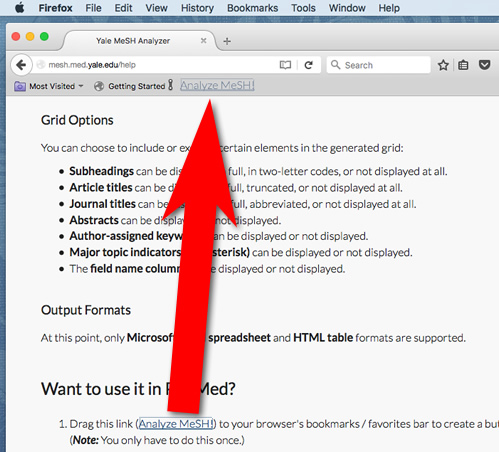
Drag this link (Analyze MeSH!) to your browser’s bookmarks / favorites bar to create a button.
Note: You only have to do this once.
-
2
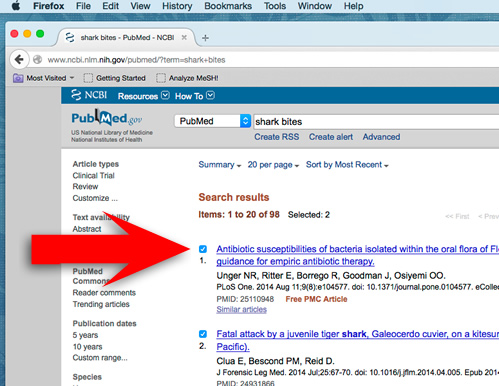
In a PubMed search results page, select the records you want to analyze.
-
3
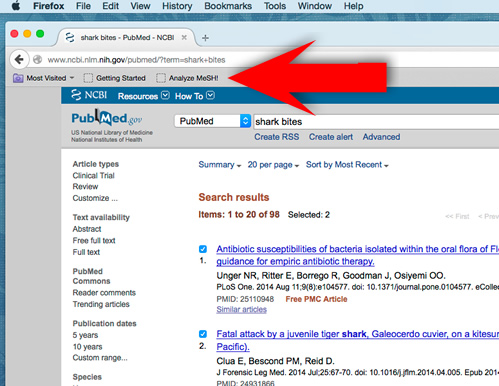
Click the button you just created in your browser’s bookmarks / favorites bar.
How to cite
Grossetta Nardini, H. K., & Wang, L. (2015-2026). The Yale MeSH Analyzer. Retrieved from http://mesh.med.yale.edu/
Grossetta Nardini HK, Wang L. The Yale MeSH Analyzer. 2015-2026; http://mesh.med.yale.edu/. Accessed Date Accessed.
Grossetta Nardini HK, Wang L. The Yale MeSH Analyzer [Internet]. New Haven, CT: Cushing/Whitney Medical Library; 2015-2026 [cited Date Accessed]. Available from: http://mesh.med.yale.edu/.